
NIO:缓冲区
大约 4 分钟
NIO:缓冲区
基本介绍
缓冲区(Buffer):缓冲区本质上是一个可以读写数据的内存块,用于特定基本数据类型的容器,用于与 NIO 通道进行交互,数据是从通道读入缓冲区,从缓冲区写入通道中的
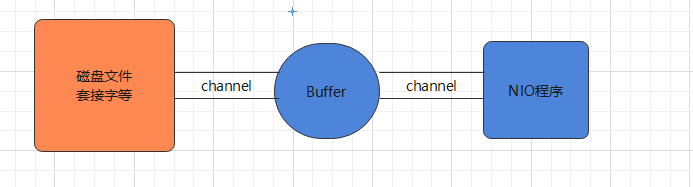
Buffer 底层是一个数组,可以保存多个相同类型的数据,根据数据类型不同 ,有以下 Buffer 常用子类:ByteBuffer、CharBuffer、ShortBuffer、IntBuffer、LongBuffer、FloatBuffer、DoubleBuffer
基本属性
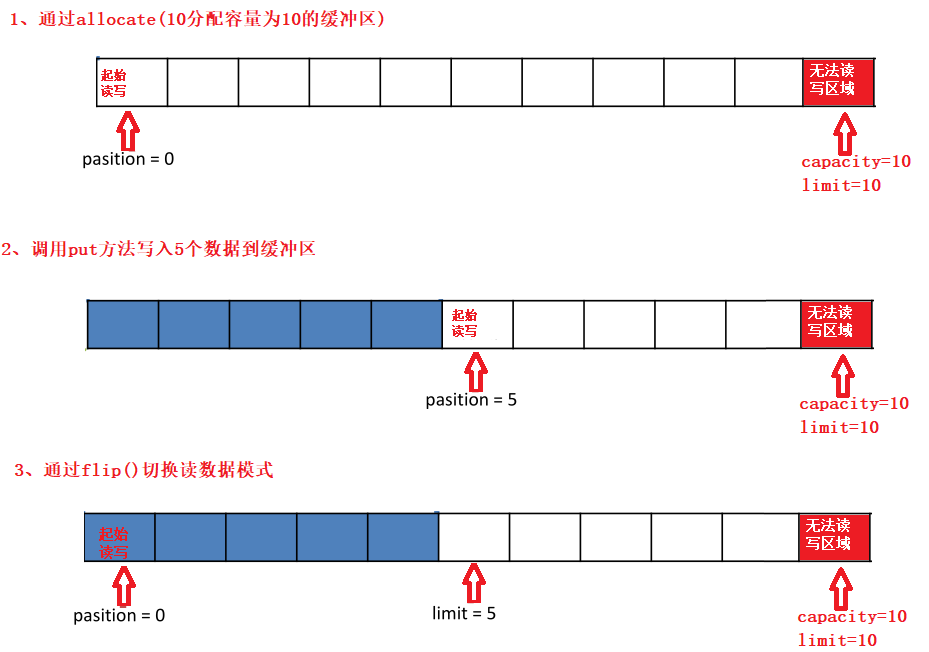
- 容量(capacity):作为一个内存块,Buffer 具有固定大小,缓冲区容量不能为负,并且创建后不能更改
- 限制 (limit):表示缓冲区中可以操作数据的大小(limit 后数据不能进行读写),缓冲区的限制不能为负,并且不能大于其容量。写入模式,limit 等于 buffer 的容量;读取模式下,limit 等于写入的数据量
- 位置(position):下一个要读取或写入的数据的索引,缓冲区的位置不能为负,并且不能大于其限制
- 标记(mark)与重置(reset):标记是一个索引,通过 Buffer 中的 mark() 方法指定 Buffer 中一个特定的位置,可以通过调用 reset() 方法恢复到这个 position
- 位置、限制、容量遵守以下不变式: 0 <= position <= limit <= capacity
常用API
static XxxBuffer allocate(int capacity):创建一个容量为 capacity 的 XxxBuffer 对象
Buffer 基本操作:
| 方法 | 说明 |
|---|---|
| public Buffer clear() | 清空缓冲区,不清空内容,将位置设置为零,限制设置为容量 |
| public Buffer flip() | 翻转缓冲区,将缓冲区的界限设置为当前位置,position 置 0 |
| public int capacity() | 返回 Buffer的 capacity 大小 |
| public final int limit() | 返回 Buffer 的界限 limit 的位置 |
| public Buffer limit(int n) | 设置缓冲区界限为 n |
| public Buffer mark() | 在此位置对缓冲区设置标记 |
| public final int position() | 返回缓冲区的当前位置 position |
| public Buffer position(int n) | 设置缓冲区的当前位置为n |
| public Buffer reset() | 将位置 position 重置为先前 mark 标记的位置 |
| public Buffer rewind() | 将位置设为为 0,取消设置的 mark |
| public final int remaining() | 返回当前位置 position 和 limit 之间的元素个数 |
| public final boolean hasRemaining() | 判断缓冲区中是否还有元素 |
| public static ByteBuffer wrap(byte[] array) | 将一个字节数组包装到缓冲区中 |
| abstract ByteBuffer asReadOnlyBuffer() | 创建一个新的只读字节缓冲区 |
| public abstract ByteBuffer compact() | 缓冲区当前位置与其限制(如果有)之间的字节被复制到缓冲区的开头 |
Buffer 数据操作:
| 方法 | 说明 |
|---|---|
| public abstract byte get() | 读取该缓冲区当前位置的单个字节,然后位置 + 1 |
| public ByteBuffer get(byte[] dst) | 读取多个字节到字节数组 dst 中 |
| public abstract byte get(int index) | 读取指定索引位置的字节,不移动 position |
| public abstract ByteBuffer put(byte b) | 将给定单个字节写入缓冲区的当前位置,position+1 |
| public final ByteBuffer put(byte[] src) | 将 src 字节数组写入缓冲区的当前位置 |
| public abstract ByteBuffer put(int index, byte b) | 将指定字节写入缓冲区的索引位置,不移动 position |
提示:"\n",占用两个字节
读写数据
使用 Buffer 读写数据一般遵循以下四个步骤:
- 写入数据到 Buffer
- 调用 flip()方法,转换为读取模式
- 从 Buffer 中读取数据
- 调用 buffer.clear() 方法清除缓冲区(不是清空了数据,只是重置指针)
public class TestBuffer {
	@Test
    public void test(){
		String str = "seazean";
		//1. 分配一个指定大小的缓冲区
		ByteBuffer buffer = ByteBuffer.allocate(1024);
		System.out.println("-----------------allocate()----------------");
		System.out.println(bufferf.position());//0
		System.out.println(buffer.limit());//1024
		System.out.println(buffer.capacity());//1024

        //2. 利用 put() 存入数据到缓冲区中
      	buffer.put(str.getBytes());
     	System.out.println("-----------------put()----------------");
		System.out.println(bufferf.position());//7
		System.out.println(buffer.limit());//1024
		System.out.println(buffer.capacity());//1024

        //3. 切换读取数据模式
        buffer.flip();
        System.out.println("-----------------flip()----------------");
        System.out.println(buffer.position());//0
        System.out.println(buffer.limit());//7
        System.out.println(buffer.capacity());//1024

        //4. 利用 get() 读取缓冲区中的数据
        byte[] dst = new byte[buffer.limit()];
        buffer.get(dst);
        System.out.println(dst.length);
        System.out.println(new String(dst, 0, dst.length));
        System.out.println(buffer.position());//7
        System.out.println(buffer.limit());//7

        //5. clear() : 清空缓冲区. 但是缓冲区中的数据依然存在,但是处于“被遗忘”状态
        System.out.println(buffer.hasRemaining());//true
        buffer.clear();
        System.out.println(buffer.hasRemaining());//true
      	System.out.println("-----------------clear()----------------");
      	System.out.println(buffer.position());//0
      	System.out.println(buffer.limit());//1024
      	System.out.println(buffer.capacity());//1024
    }
}
粘包拆包
网络上有多条数据发送给服务端,数据之间使用 \n 进行分隔,但这些数据在接收时,被进行了重新组合
// Hello,world\n
// I'm zhangsan\n
// How are you?\n
------ > 黏包,半包
// Hello,world\nI'm zhangsan\nHo
// w are you?\n
public static void main(String[] args) {
    ByteBuffer source = ByteBuffer.allocate(32);
    //                     11            24
    source.put("Hello,world\nI'm zhangsan\nHo".getBytes());
    split(source);

    source.put("w are you?\nhaha!\n".getBytes());
    split(source);
}

private static void split(ByteBuffer source) {
    source.flip();
    int oldLimit = source.limit();
    for (int i = 0; i < oldLimit; i++) {
        if (source.get(i) == '\n') {
            // 根据数据的长度设置缓冲区
            ByteBuffer target = ByteBuffer.allocate(i + 1 - source.position());
            // 0 ~ limit
            source.limit(i + 1);
            target.put(source); // 从source 读,向 target 写
            // debugAll(target); 访问 buffer 的方法
            source.limit(oldLimit);
        }
    }
    // 访问过的数据复制到开头
    source.compact();
}