
常用类
常用类
开发中会经常使用到的一些类的介绍
1、Object
Object 是 Java 官方提供的类,存放在 java.lang 包中,该类是所有类的直接父类或者间接父类,无论是 Java 提供的类还是开发者自定义的类,都是 Object 的直接子类或间接子类,Java 中的任何一个类都会继承 Object 中的 public 和 protected 方法。
hashCode();
getClass();
equals(null);
clone();
toString();
notify();
notifyAll();
wait();
wait(1000L);
wait(1000L, 100);
Object 类中经常被子类重写的方法:
1、public String toString() 以字符串的形式返回对象的信息
2、public boolean equals(Object obj) 判断两个对象是否相等
3、public native int hashCode() 返回对象的散列码
- toString
Object
public String toString() {
  return getClass().getName() + "@" + Integer.toHexString(hashCode());
}
//重写之后
@Override
public String toString() {
  return "People [id=" + id + ", name=" + name + ", score=" + score + "]";
}
- equals
Object
public boolean equals(Object obj) {
  return (this == obj);
}
//重写之后
@Override
public boolean equals(Object obj) {
  // TODO Auto-generated method stub
  People people = (People)obj;
  if(this.id == people.id && this.name.equals(people.name) && this.score.equals(people.score)) {
    return true;
  }
  return false;
}
- hashCode
Object
public native int hashCode();
//重写之后
@Override
public int hashCode() {
  // TODO Auto-generated method stub
  return (int) (id*name.hashCode()*score);
}
2、包装类
- 什么是包装类?
包装类是 Java 提供的一组类,专门用来创建 8 种基本数据类型对应的对象,一共有 8 个包装类,存放在 java.lang 包中,基本数据类型对应的包装类。
| byte | Byte |
|---|---|
| short | Short |
| int | Integer |
| long | Long |
| float | Float |
| double | Double |
| char | Character |
| boolean | Boolean |
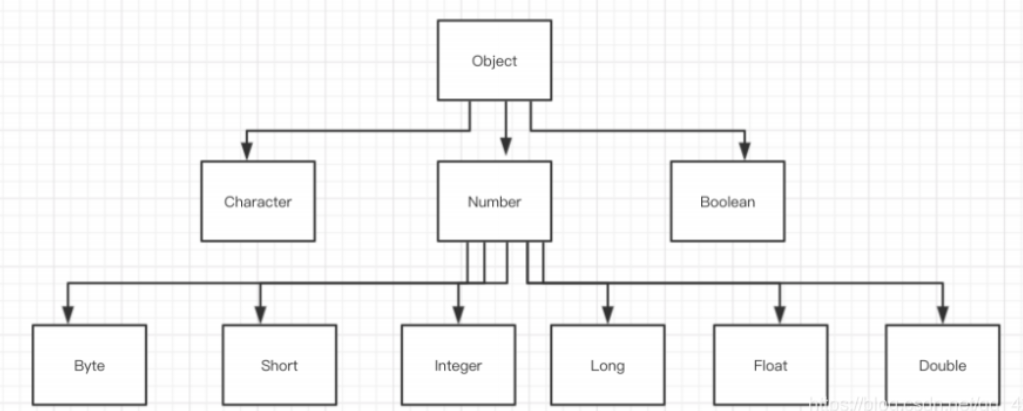
包装类的体系结构
Java 官方提供的一组类,这组类的作用是将基本数据类型的数据封装成引用类型。
Byte、Integer、Short、Long、Float、Double、Boolean、Characte
3、装箱和拆箱
装箱和拆箱是包装类的特有名词,装箱是指将基本数据类型转为对应的包装类对象,拆箱就是将包装类对象转为对应的基本数据类型。
装箱与拆箱
装箱是指将基本数据类型转换为包装类对象。
拆箱是指将包装类对象转换为基本数据类型。
3.1、构造函数
1、public Type(type value) 【即原类型】
每个包装类都提供了一个有参构造函数:public Type(type value),用来实例化包装类对象。
byte b = 1;
Byte byt = new Byte(b);
short s = 2;
Short shor = new Short(s);
int i = 3;
Integer integer = new Integer(i);
long l = 4;
Long lon = new Long(l);
float f = 5.5f;
Float flo = new Float(f);
double d = 6.6;
Double dou = new Double(d);
char cha = 'J';
Character charac = new Character(cha);
boolean bo = true;
Boolean bool = new Boolean(bo);
System.out.println(byt);
System.out.println(shor);
System.out.println(integer);
System.out.println(lon);
System.out.println(flo);
System.out.println(dou);
System.out.println(charac);
System.out.println(bool);
2、public Type(String value)/public Type(char value) 【即字符/字符串类型】
每个包装类还有一个重载构造函数:
Character 类的重载构造函数:public Type(char value),其他包装类的重载构造函数:public Type(String value)。
Byte byt = new Byte("1");
Short shor = new Short("2");
Integer integer = new Integer("3");
Long lon = new Long("4");
Float flo = new Float("5.5f");
Double dou = new Double("6.6");
Character charac = new Character('J');
Boolean bool = new Boolean("abc");
System.out.println(byt);
System.out.println(shor);
System.out.println(integer);
System.out.println(lon);
System.out.println(flo);
System.out.println(dou);
System.out.println(charac);
需要注意的是,Boolean 类的构造函数中,当参数为 “true” 时,Boolean 值为 true,当参数不为 “true”,Boolean 值为 false。
3.2、装箱
1、public Type(type value)
2、public Type(String value)/public Type(char value)
3、valueOf(type value) 静态方法,参数是基本数据类型的数据
每一个包装类都有一个 valueOf(type value) 方法
byte b = 1;
Byte byt = Byte.valueOf(b);
short s = 2;
Short shot = Short.valueOf(s);
int i = 3;
Integer integer = Integer.valueOf(i);
long l = 4L;
Long lon = Long.valueOf(l);
float f = 5.5f;
Float floa = Float.valueOf(f);
double d = 6.6;
Double doub = Double.valueOf(d);
boolean boo = true;
Boolean bool = Boolean.valueOf(boo);
char ch = 'J';
Character cha = Character.valueOf(ch);
其中:
//valueOf(String value)/valueOf(char value) 专门为 Character 转换使用的,
//其他的 7 个包装类都可以使用 valueOf(String value)。
Byte byt = Byte.valueOf("1");
Short sho = Short.valueOf("2");
Integer integer = Integer.valueOf("3");
Long lon = Long.valueOf("4");
Float flo = Float.valueOf("5.5f");
Double dou = Double.valueOf("6.6");
Boolean boo = Boolean.valueOf("true");
Character cha = Character.valueOf('J');
需要注意的是 Boolean.valueOf(String value) 方法中,当 value 为 “true” 时,Boolean 的值为 true,否则,Boolean 的值为 false。
3.3、拆箱
1、*Value() 每个包装类都有一个 *Value() 方法,通过该方法可以将包装类转为基本数据类型。
Byte byt = Byte.valueOf("1");
Short sho = Short.valueOf("2");
Integer integer = Integer.valueOf("3");
Long lon = Long.valueOf("4");
Float flo = Float.valueOf("5.5f");
Double dou = Double.valueOf("6.6");
Boolean boo = Boolean.valueOf("true");
Character cha = Character.valueOf('J');

byte b = byt.byteValue();
short sh = sho.shortValue();
int i = integer.intValue();
long l = lon.longValue();
float f = flo.floatValue();
double d = dou.doubleValue();
boolean bo = boo.booleanValue();
char c = cha.charValue();
2、parse*(String value)
除了 Character 类以外的每一个包装类都有一个静态方法可以将字符串类型转为基本数据类型。
byte b = Byte.parseByte("1");
short s = Short.parseShort("2");
int i = Integer.parseInt("3");
long l = Long.parseLong("4");
float f = Float.parseFloat("5.5");
double d = Double.parseDouble("6.6");
boolean bo = Boolean.parseBoolean("true");
3、toString(type value)
每个包装类都有该方法,作用是将基本数据类型转为 String 类型。
byte b = 1;
String bstr = Byte.toString(b);
short s = 2;
String sstr = Short.toString(s);
String i = Integer.toString(3);
long l = 4L;
String lstr = Long.toString(l);
float f = 5.5f;
String fstr = Float.toString(f);
double d = 6.6;
String dstr = Double.toString(d);
boolean bo = true;
String bostr = Boolean.toString(bo);
String chstr = Character.toString('J');
4、Math
Math 类为开发者提供了一系列的数学方法,同时还提供了两个静态常量 E(自然对数的底数)和 PI(圆周率)。
public class Test {
    public static void main(String[] args) {
        System.out.println("常量E"+Math.E);
        System.out.println("常量PI"+Math.PI);
        System.out.println("9的平方根"+Math.sqrt(9));
        System.out.println("8的立方根"+Math.cbrt(8));
        System.out.println("2的3次方"+Math.pow(2,3));
        System.out.println("较大值"+Math.max(6.5,1));
        System.out.println("-10.3的绝对值"+Math.abs(-10.3));
        System.out.println(Math.ceil(10.000001));
        System.out.println(Math.floor(10.999999));
        System.out.println((int)(Math.random()*10));
        System.out.println(Math.rint(5.4));
    }
}
5、Random
用来产生随机数的类,并且可以任意指定一个区间,在此区间范围内产生一个随机数。
| 方法 | 描述 |
|---|---|
| public Random() | 创建一个无参的随机数构造器,使用系统时间作为默认种子 |
| public Random(long seed) | 使用 long 数据类型的种子创建一个随机数构造器 |
| public boolean nextBoolean() | 返回一个 boolean 类型的随机数 |
| public double nextDouble() | 返回一个 double 类型的随机数,0.0 - 1.0 之间 |
| public float nextFloat() | 返回一个 float 类型的随机数,0.0 - 1.0 之间 |
| public int nextInt() | 返回一个 int 类型的随机数 |
| public int nextInt(n) | 返回一个 int 类型的随机数,0-n之间 |
| public long nextLong | 返回一个 long 类型的随机数,0-1 之间 |
public class Test {
    public static void main(String[] args) {
        Random random = new Random();
        //生成订单编号(时间戳+随机数)
        for (int i = 1; i <= 10000; i++) {
            //随机生成一个六位数
            System.out.println("订单"+i+"的编号是:"+System.currentTimeMillis()+random.nextInt(100000)+100000);
        }

    }
}
6、String
Java 通过 String 类来创建和操作字符串数据。
- String 实例化
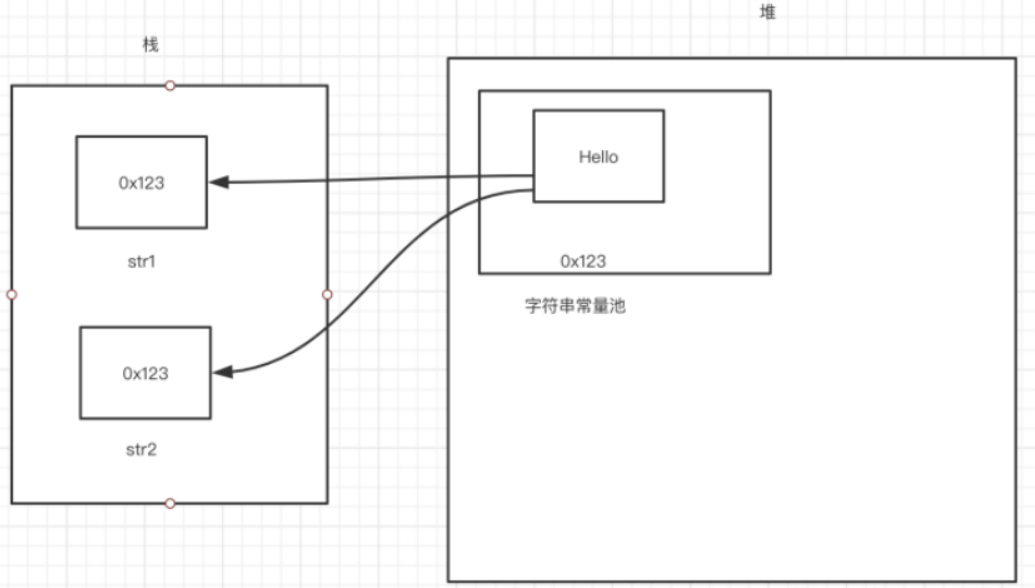
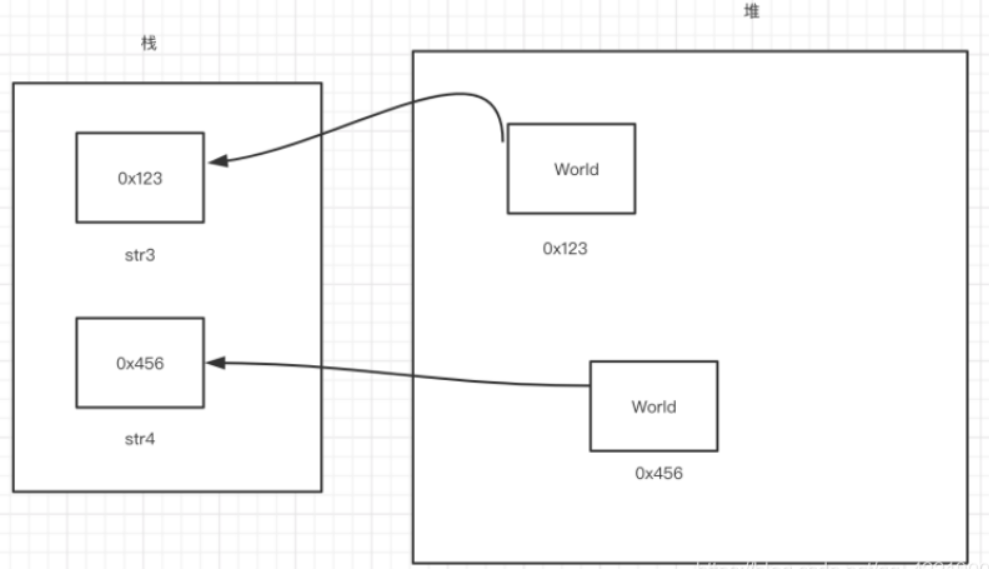
1、直接赋值
String str = "Hello World";
2、通过构造函数创建对象
String str = new String("Hello World");
isLatin1() ? StringLatin1.equals(value, aString.value)
	:StringUTF16.equals(value, aString.value);
三目运算符 三元表达式
1、String 常用方法
| 方法 | 描述 |
|---|---|
| public String() | 创建一个空的字符串对象 |
| public String(String value) | 创建一个值为 value 的字符串对象 |
| public String(char value[]) | 将一个char数组转换为字符串对象 |
| public String(char value[],int offset, int count) | 将一个指定范围的char数组转为字符串对象 |
| public String(byte value[]) | 将一个byte数组转换为字符串对象 |
| public String(byte value[],int offset, int count) | 将一个指定范围的byte数组转为字符串对象 |
| public int length() | 获取字符串的长度 |
| public boolean isEmpty() | 判断字符串是否为空 |
| public char charAt(int index) | 返回指定下标的字符 |
| public byte[] getBytes() | 返回字符串对应的byte数组 |
| public boolean equals(Object anObject) | 判断两个字符串值是否相等 |
| public boolean equalsIgnoreCase(Object anObject) | 判断两个字符串值是否相等(忽略大小写) |
| public int compareTo(String value) | 对字符串进行排序 |
| public int compareToIgnoreCase(String value) | 忽略大小写进行排序 |
| public boolean startsWith(String value) | 判断字符串是否以 value 开头 |
| public boolean endsWith(String value) | 判断字符串是否以 value 结尾 |
| public int hashCode() | 返回字符串的 hash 值 |
| public int indexOf(String str) | 返回 str 在字符串中的下标 |
| public int indexOf(String str,int formIndex) | 从指定位置查找字符串的下标 |
| public String subString(int beginIndex) | 从指定位置开始截取字符串 |
| public String subString(int beginIndex,int endIndex) | 截取指定区间的字符串 |
| public String concat(String str) | 追加字符串 |
| public String replaceAll(String o,String n) | 将字符串中所有的 o 替换成 n |
| public String[] split(String regex) | 用指定的字符串对目标进行分割,返回数组 |
| public String toLowerCase() | 转小写 |
| public String toUpperCase() | 转大写 |
| public char[] toCharArray() | 将字符串转为字符数组 |
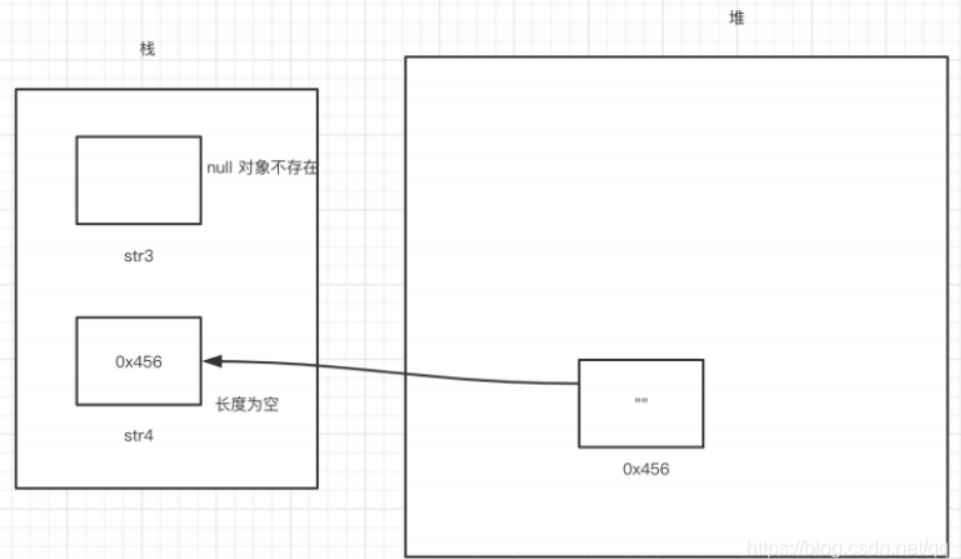
null 和空是两个概念。
null 是指对象不存在,引用地址为空。
空是指对象存在,没有内容,长度为零。
2、StringBuffer
String 对象一旦创建,值不能修改(原来的值不能修改,一旦修改就是一个新的对象,只要一改动,就会创建一个新的对象)
修改之后会重新开辟内存空间来存储新的对象,会修改 String 的引用。
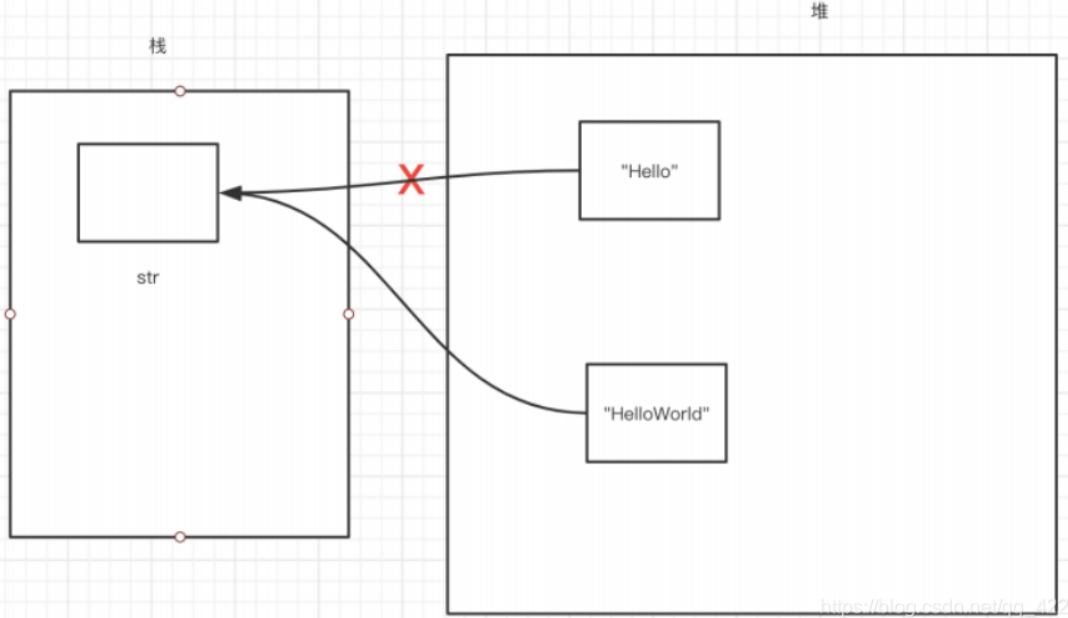
String 的值为什么不能修改?修改之后会创建一个新的对象?而不是在原有对象的基础上进行修改?
因为 String 底层是用数组来存值的,数组长度一旦创建就不可修改,所以导致上述问题。
StringBuffer 可以解决 String 频繁修改造成的空间资源浪费的问题。
StringBuffer 底层也是使用数组来存值。
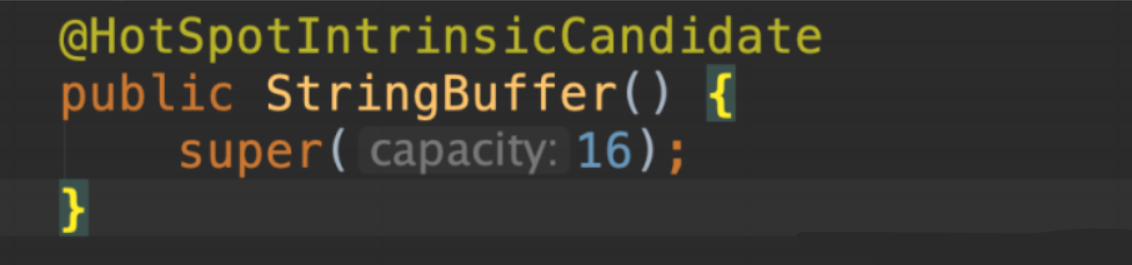
- StringBuffer 数组的默认长度为 16,使用无参构造函数来创建对象。
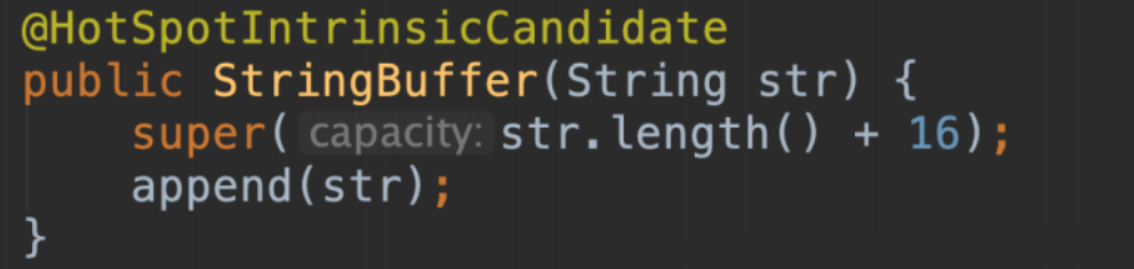
- 使用有参构造创建对象,数组长度=值的长度+16。
public class Test {
    public static void main(String[] args) {
        StringBuffer stringBuffer = new StringBuffer("Hello");
        StringBuffer stringBuffer1 = new StringBuffer();
        //stringBuffer 底层数组的长度是 21
        //stringBuffer1 底层数组的长度是 16
        stringBuffer1.append("Hello");
        System.out.println(stringBuffer.toString().equals(stringBuffer1.toString()));
        System.out.println(stringBuffer.length());
        System.out.println(stringBuffer1.length());
    }
}
length 方法返回的并不是底层数组的长度,而是它的有效长度(值的长度)。
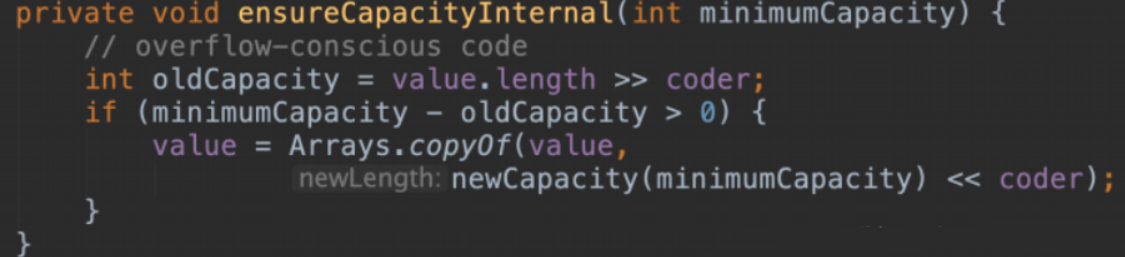
StringBuffer 一旦创建,默认会有 16 个字节的空间去修改,但是一旦追加的字符串长度超过 16,如何处理?
StringBuffer 不会重新开辟一块新的内存区域,而是在原有的基础上进行扩容,通过调用父类 ensureCapacityInternal() 方法对底层数组进行扩容,保持引用不变。
StringBuffer 的常用方法,StringBuffer 是线程安全的,但是效率较低,StringBuilder 是线程不安全的,但是效率较高。
HashMap:线程不安全,效率高
Hashtable:线程安全,效率低
| 方法 | 描述 |
|---|---|
| public StringBuffer() | 创建一个空的 StringBuffer对象 |
| public StringBuffer(String str) | 创建一个值为 str 的 StringBuffer 对象 |
| public synchronized int length() | 返回 StringBuffer 的长度 |
| public synchronized char charAt(int index) | 返回指定位置的字符 |
| public synchronized StringBuffer append(String str) | 追加内容 |
| public synchronized StringBuffer delete(int start,int end) | 删除指定区间的值 |
| public synchronized StringBuffer deleteCharAt(int index) | 删除指定位置的字符 |
| public synchronized StringBuffer replace(int start,int end,String str) | 将指定区间的值替换成 str |
| public synchronized String substring(int start) | 截取字符串从指定位置到结尾 |
| public synchronized String substring(int start,int end) | 截取字符串从start开始,到end结束 |
| public synchronized StringBuffer insert(int offset,String str) | 在指定位置插入 str |
| public int indexOf(String str) | 从头开始查找指定字符的位置 |
| public int indexOf(String str,int fromIndex) | 从fromIndex开始查找指定字符的位置 |
| public synchronized StringBuffer reverse() | 进行反转 |
| public synchronized String toString() | 转为 String |
读取数据不需要考虑线程安全问题,因为这种操作不存在安全隐患。
7、日期类
1、JDK8之前
- java.util.Date
Date 对象表示当前的系统时间
- java.util.Calendar
Calendar 用来完成日期数据的逻辑运算
- java.text.SimpleDateFormat
SimpleDateFormat 用来格式化时间
运算思路:(op+com+t)
1、将日期数据传给 Calendar(Calendar 提供了很多静态常量,专门用来记录日期数据)
| 常量 | 描述 |
|---|---|
| public static final int YEAR | 年 |
| public static final int MONTH | 月 |
| public static final int DAY_OF_MONTH | 天,以月为单位 |
| public static final int DAY_OF_YEAR | 天,以年为单位 |
| public static final int HOUR_OF_DAY | 小时 |
| public static final int MINUTE | 分钟 |
| public static final int SECOND | 秒 |
| public static final int MILLSECOND | 毫秒 |
2、调用相关方法进行运算
| 方法 | 描述 |
|---|---|
| public static Calendar getInstance() | 获取Calendar实例化对象 |
| public void set(int field,int value) | 给静态常量赋值 |
| public int get(int field) | 获取静态常量的值 |
| public final Date getTime() | 将Calendar转为Date对象 |
public class Test {
    public static void main(String[] args) {
        //计算今天所在的周是2020年的第几周
        Calendar calendar = Calendar.getInstance();
        calendar.set(Calendar.YEAR,2020);
        //1月为0,4月为3
        calendar.set(Calendar.MONTH,3);
        calendar.set(Calendar.DAY_OF_MONTH,9);
        int week = calendar.get(Calendar.WEEK_OF_YEAR);
        System.out.println(week);

        //今天之后的63天是几月几号
        int days = calendar.get(Calendar.DAY_OF_YEAR);
        days += 63;
        calendar.set(Calendar.DAY_OF_YEAR,days);
        Date date = calendar.getTime();
        SimpleDateFormat simpleDateFormat = new SimpleDateFormat("yyyy-MM-dd");
        System.out.println(simpleDateFormat.format(date));
        //今天之前的63天是几月几号

        //        calendar.set(Calendar.YEAR,2020);
        //        //1月为0,4月为3
        //        calendar.set(Calendar.MONTH,3);
        //        calendar.set(Calendar.DAY_OF_MONTH,9);

        calendar.set(Calendar.DAY_OF_YEAR,100);
        calendar.set(Calendar.DAY_OF_YEAR,calendar.get(Calendar.DAY_OF_YEAR)-63);
        date = calendar.getTime();
        System.out.println(simpleDateFormat.format(date));
    }
}
2、JDK8新增
在Java 8之前,所有关于时间和日期的API都存在各种使用方面的缺陷,主要有:
- Java的java.util.Date和java.util.Calendar类易用性差,不支持时区,而且他们都不是线程安全的;
- 用于格式化日期的类DateFormat被放在java.text包中,它是一个抽象类,所以我们需要实例化一个SimpleDateFormat对象来处理日期格式化,并且DateFormat也是非线程安全,你得把它用ThreadLocal包起来才能在多线程中使用。
- 对日期的计算方式繁琐,而且容易出错,因为月份是从0开始的,从Calendar中获取的月份需要加一才能表示当前月份。 由于以上这些问题,出现了一些三方的日期处理框架,例如Joda-Time,date4j等开源项目。但是,Java需要一套标准的用于处理时间和日期的框架,于是Java 8中引入了新的日期API。新的日期API是JSR-310规范的实现,Joda-Time框架的作者正是JSR-310的规范的倡导者,所以能从Java 8的日期API中看到很多Joda-Time的特性。
JDK8 中增加了一套全新的日期时间 API,这套 API 设计合理,是线程安全的。新的日期及时间 API 位于 java.time 包下,如下是一些该包下的关键类:
- LocalDate:表示日期,包含:年月日。格式为:2021-04-05
- LocalTime:表示时间,包含:时分秒。格式为:16:39:09.307
- LocalDateTime:表示日期时间,包含:年月日 时分秒。格式为:2021-04-05T16:40:59.138
- DateTimeFormatter:日期时间格式化类
- Instant:时间戳类
- Duration:用于计算 2 个时间(LocalTime,时分秒)之间的差距
- Period:用于计算 2 个日期(LocalDate,年月日)之间的差距
- ZonedDateTime:包含时区的时间
Java 中使用的历法是 ISO-8601 日历系统,他是世界民用历法,也就是我们所说的公里。平年有365天,闰年是366天。此外 Java8 还提供了 4 套其他历法,分别是:
- ThaiBuddhistDate:泰国佛教历
- MinguoDate:中华民国历
- JapaneseDate:日本历
- HijrahDate:伊斯兰历
用法介绍
7.2.1、日期和时间类
LocalDate、LocalTime、LocalDateTime类的实例是不可变的对象,分别表示使用 ISO-8601 日历系统的日期、时间、日期和时间。他们提供了简单的日期或时间,并不包含当前的时间信息,也不包含与时区相关的信息。
对日期时间的修改,就是对已经存在的 LocalDate对象,根据需求创建它的修改版,最简单的方式是使用 withAttribute() 方法。withAttribute()方法会创建对象的一个副本,并按照需要修改它的属性。
以下所有方法都返回了一个修改属性的对象,它们并不会影响原来的日期对象。(即:修改后的日期与原来的日期不是一个对象,原日期不受影响)
public class DateDemo02 {

    /**
     * LocalDate 日期类(年月日)
     */
    @Test
    public void testLocalDate() {
        //获取当前日期
        LocalDate now = LocalDate.now();
        System.out.println(now);
        //指定日期 LocalDate.of(year,month,day)
        LocalDate date = LocalDate.of(2008, 8, 8);
        System.out.println(date);
        //获取年
        System.out.println("年:" + date.getYear());
        //获取月(英文)
        System.out.println("月(英文):" + date.getMonth());
        //获取月(阿拉伯数字)
        System.out.println("月(数字):" + date.getMonthValue());
        //获取日
        System.out.println("日:" + date.getDayOfMonth());
        //是否是闰年
        System.out.println("是否是闰年:" + date.isLeapYear());
        //...其他方法,自行研究
    }

    /**
     * LocalDate 时间类(时分秒)
     */
    @Test
    public void testLocalTime() {
        //获取当前时间
        LocalTime now = LocalTime.now();
        System.out.println(now);
        //指定日期 LocalTime.of(hour,minute,second)
        LocalTime date = LocalTime.of(13, 26, 39);
        System.out.println(date);
        //获取时
        System.out.println(date.getHour());
        //获取分
        System.out.println(date.getMinute());
        //获取秒
        System.out.println(date.getSecond());
        //获取纳秒
        System.out.println(now.getNano());
        //...其他方法,自行研究

    }

    /**
     * LocalDateTime 日期时间类(年月日 时分秒)
     */
    @Test
    public void testLocalDateTime() {
        //LocalDateTime: LocalDate + LocalTime,有年月日 时分秒
        LocalDateTime now = LocalDateTime.now();
        System.out.println("当前日期时间:"+now);
        //指定日期时间 LocalDateTime.of(year,month,day,hour,minute,second)
        LocalDateTime date = LocalDateTime.of(2018, 7, 23, 18, 59, 31);
        System.out.println(date);
        //获取年
        System.out.println(date.getYear());
        //获取月
        System.out.println(date.getMonth());
        //获取日
        System.out.println(date.getDayOfMonth());
        //获取时
        System.out.println(date.getHour());
        //获取分
        System.out.println(date.getMinute());
        //获取秒
        System.out.println(date.getSecond());
        //...其他方法,自行研究
    }

    /**
     * 修改时间
     */
    @Test
    public void modifyTime() {
        //以LocalDateTime为例(LocalDate、LocalTime与此类似)
        LocalDateTime now = LocalDateTime.now();
        //修改年[修改时间(不是JDK8之前的setXXX(),而是使用withXXX())]
        System.out.println("修改年后:" + now.withYear(9102));
        //增加年(减使用 minusYear()方法)
        System.out.println("+2年后:" + now.plusYears(2));
        //增加日(减使用 minusDays()方法)
        System.out.println("47天后:" + now.plusDays(47));
        //...其他方法,自行研究
    }

    /**
     * 时间比较
     */
    @Test
    public void compareTime() {
        //以LocalDateTime为例(LocalDate、LocalTime与此类似)
        //时间1
        LocalDateTime now = LocalDateTime.now();
        //时间2
        LocalDateTime dateTime = LocalDateTime.of(2018, 7, 12, 13, 28, 51);
        //判断前面日期是否在后面日期后
        System.out.println("A时间是否晚于B时间:" + now.isAfter(dateTime));
        //判断前面日期是否在后面日期前
        System.out.println("A时间是否早于B时间:" + now.isBefore(dateTime));
        //判断两个日期时间是否相等
        System.out.println("两个时间是否相等:" + now.isEqual(dateTime));
        //...其他方法,自行研究
    }
7.2.2、日期时间格式化与解析
public class DateDemo03 {

    @Test
    public void dateFormat(){
        LocalDateTime now = LocalDateTime.now();

        //格式化
        //使用JDK自带的时间格式:ISO_DATE_TIME(默认提供了很多格式,请自行查看)
        DateTimeFormatter dtf = DateTimeFormatter.ISO_DATE_TIME;
        String format = now.format(dtf);
        System.out.println("format="+format);

        //指定时间格式(ofPattern()方法)
        DateTimeFormatter dtf1 = DateTimeFormatter.ofPattern("yyyy年MM月dd日 HH时mm分ss秒");
        String format1 = now.format(dtf1);
        System.out.println(format1);

        //解析(parse()方法)
        LocalDateTime parse = LocalDateTime.parse(format1, dtf1);
        System.out.println("parse="+parse);

        /**
         * 多线程执行(验证线程安全性)
         * 1.返回结果正确   2.不抛异常
         */
        for (int i = 0; i < 50; i++) {
            new Thread(()->{
                LocalDateTime parse1 = LocalDateTime.parse(format1, dtf1);
                System.out.println("parse="+parse1);
            }).start();
        }
    }
}
7.2.3、Instant 类
Instant 类,就是时间戳,内部保存了从1970年1月1日 00:00:00以来的秒和纳秒。
public class DateDemo04 {

    @Test
    public void Instant(){
        //Instant
        // 内部保存了秒和纳秒,一般不是给用户使用的,而是方便程序做一些统计的(比如:统计方法耗时)
        Instant now = Instant.now();
        System.out.println("当前时间戳:"+now);//2020-01-13T06:48:46.267Z
        //Instant类 并没有修改年月日等操作.因为 Instant 本来就不是给用户使用的
        //Instant类:对 秒、纳秒等操作方便
        Instant plus = now.plusSeconds(20);
        System.out.println("+20秒后:"+plus);

        Instant minus = now.minusSeconds(20);
        System.out.println("-20秒后:"+minus);

        //获取秒、毫秒、纳秒
        long second = now.getEpochSecond();
        System.out.println("秒:"+second);
        int nano = now.getNano();
        System.out.println("纳秒:"+nano);
        //...其他方法,自行研究
    }
}
7.2.4、计算日期时间差类
Duration/Period 类:主要用来计算日期时间差
- Duration:用于计算 2 个时间(LocalTime,时分秒)的差值
- Period:用于计算 2 个 日期(LocalDate,年月日)的差值
public class DateDemo05 {

    /**
     * Duration类:计算时间的差值
     */
    @Test
    public void testTimeDiff(){
        //时间1
        LocalTime now = LocalTime.now();
        //时间2
        LocalTime dateTime = LocalTime.of(8, 15, 46);
        //计算两个时间的差值
        //计算规则:让第二个参数 减去 第一个参数(位置错误可能出现负数)
        Duration duration = Duration.between(dateTime,now);
        System.out.println("相差的天数:"+duration.toDays());
        System.out.println("相差的小时数:"+duration.toHours());
        System.out.println("相差的分钟数:"+duration.toMinutes());
        System.out.println("相差的秒数:"+duration.toSeconds());//JDK 9+ 出现(JDK8会报错误)
        System.out.println("相差的纳秒数:"+duration.toNanos());
        //...其他方法,自行研究
    }

    /**
     * Period类:计算日期的差值
     */
    @Test
    public void testDateDiff(){
        //日期1
        LocalDate now = LocalDate.now();
        //日期2
        LocalDate date = LocalDate.of(1999,5,29);
        //计算两个日期的差值
        //计算规则:让第二个参数 减去 第一个参数(位置错误可能出现负数)
        Period period = Period.between(date,now);
        System.out.println("相差的年:"+period.getYears());
        System.out.println("相差的月:"+period.getMonths());
        System.out.println("相差的日:"+period.getDays());
        //...其他方法,自行研究
    }
}
7.2.3、日期时间调整器
有时我们可能需要获取,例如:"将日期调整到下一个月的第一天"等操作,此时我们可以通过时间调整器来进行操作。
- TemporalAdjuster:时间调整器
- TemporalAdjusters:工具类。该类通过静态方法提供了大量的常用 TemporalAdjuster 的实现
public class DateDemo06 {

    /**
     * TemporalAdjuster类:自定义调整时间
     */
    @Test
    public void timeCorrector(){
        //将日期调整到"下一个月的第一天"操作
        LocalDateTime now = LocalDateTime.now();
        //参数:TemporalAdjuster adjuster。TemporalAdjuster是一个接口,里面只有 Temporal adjustInto(Temporal temporal); 这一个方法,支持接入 lambda 表达式
        //此处 Temporal 就是指时间(包括 LocalDate、LocalTime、LocalDateTime 都是继承自该类。继承关系:如下图所示)
        TemporalAdjuster adjuster = ( Temporal temporal)->{
            LocalDateTime dateTime = (LocalDateTime)temporal;
            return dateTime.plusMonths(1).withDayOfMonth(1);//下一个月第一天
        };
        LocalDateTime newDateTime = now.with(adjuster);
        System.out.println("下个月第一天:"+newDateTime);
    }

    /**
     * TemporalAdjusters工具类:使用JDK提供的时间调整器
     */
    @Test
    public void JDKTimeCorrector(){
        //JDK中自带了很多时间调整器,其他调整器请自行查看
        //使用 TemporalAdjusters 工具类
        //TemporalAdjusters.firstDayOfNextYear()--->根据内容可知:下一年第一天
        TemporalAdjuster temporalAdjuster = TemporalAdjusters.firstDayOfNextYear();

        LocalDateTime now = LocalDateTime.now();
        LocalDateTime newDateTime = now.with(temporalAdjuster);
        System.out.println("下个月第一天:"+newDateTime);
    }
}
附:继承关系(LocalDate、LocalTime、LocalDateTime、Temporal类) 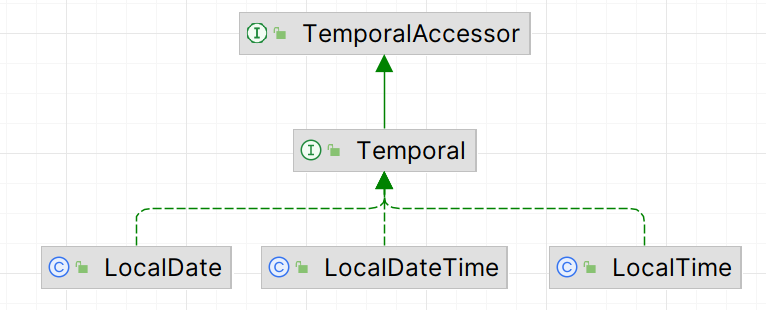
7.2.3、设置日期时间的时区
JDK8 中加入了对时区的支持。LocalDate、LocalTime、LocalDateTime 是不带时区的,带时区的日期时间类分别为:ZonedDate、ZonedTime、ZonedDateTime类。
其中每个时区都有对应着的 ID,ID的格式为"区域/城市",例如:Asia/Shanghai 等。
ZoneId类:该类中包含了所有的时区信息。
public class DateDemo07 {

    /**
     * 获取时区ID
     */
    @Test
    public void getZoneIds(){
        //1.获取所有的时区ID
        Set<String> zoneIds = ZoneId.getAvailableZoneIds();
        zoneIds.forEach(System.out::println);//返回600来个时区
    }

    /**
     * 不带时区 Vs 带时区的日期时间
     */
    @Test
    public void ZonedDemo(){
        //2.操作带时区的类
        //不带时间,获取计算机的当前时间
        LocalDateTime now = LocalDateTime.now();
        System.out.println("now:"+now);

        //中国使用的是东八区的时间,比标准时间早8个小时
        //操作带时间的类
        ZonedDateTime zdt = ZonedDateTime.now(Clock.systemUTC());//创建出来的时间是世界标准时间
        System.out.println("世界标准时间:"+zdt);
    }

    /**
     * 本地时间
     */
    @Test
    public void localTime(){
        //now():使用计算机的默认的时区,创建日期时间
        ZonedDateTime now = ZonedDateTime.now();
        System.out.println("本地时间:"+now);//本地时间:2020-01-13T15:52:43.633+08:00[Asia/Shanghai]
    }

    /**
     * 使用指定的时区来创建时间
     */
    @Test
    public void ZoneTime(){

        ZonedDateTime now = ZonedDateTime.now(ZoneId.of("America/New_York"));
        System.out.println("设置指定时间:"+now);//设置指定时间:2020-01-13T02:56:24.776-05:00[America/New_York]
    }

    /**
     * 修改时区
     */
    @Test
    public void modifyZone(){
        ZonedDateTime now = ZonedDateTime.now(ZoneId.of("America/New_York"));

        //withZoneSameInstant():既更改时区,也更改时间
        ZonedDateTime modifyTime = now.withZoneSameInstant(ZoneId.of("Asia/Shanghai"));
        System.out.println("修改时区后的时间:"+modifyTime);

        //withZoneSameLocal():只更改时区,不更改时间
        ZonedDateTime modifyTime2 = now.withZoneSameLocal(ZoneId.of("Asia/Shanghai"));
        System.out.println("修改时区后的时间:"+modifyTime2);
    }
    //...其他方法,自行研究
}